

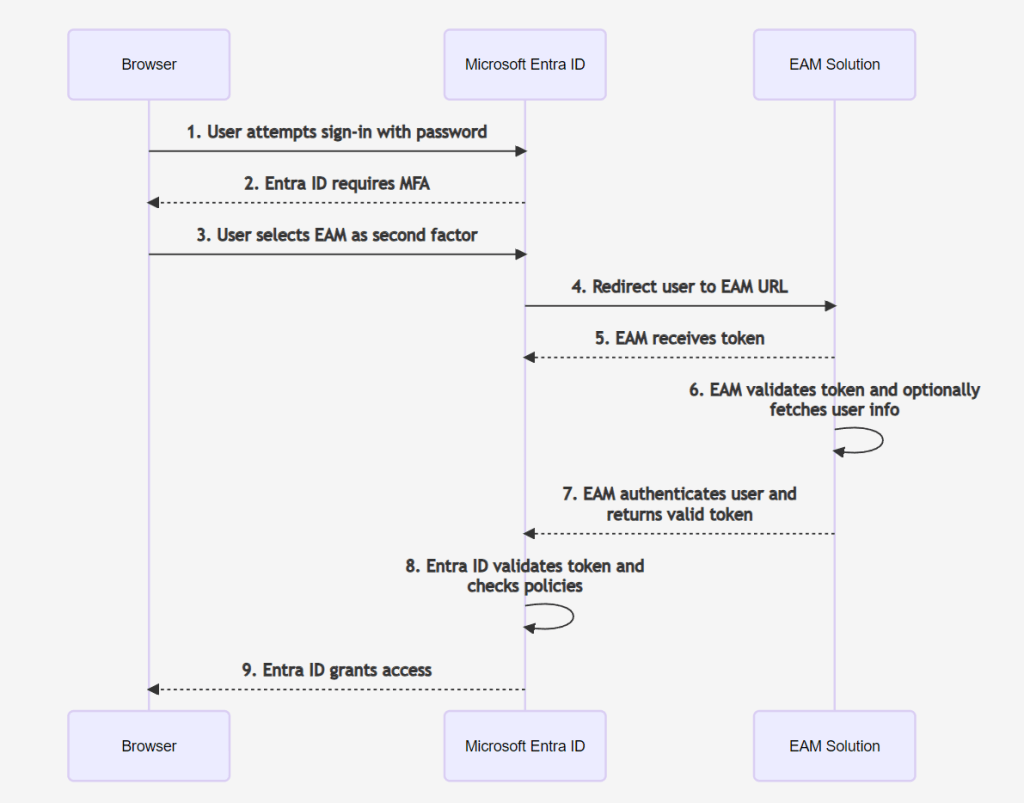
External Authentication methods is a new option in Entra ID to provide MFA and Identity proofing solutions supported by Entra ID conditional Access without federation, replacing the previous custom controls feature with an open implementation model.
Benefits
- Anyone can build their own External Authentication Method/solution by following the integration guide here.
- The documentation is really comprehensive. Just remember not to skip any parts, as you might end up banging your head against the wall for a good while.
- To provide non-federation based MFA method (outside of using the Custom Controls feature) you needed to tie in your MFA to happen outside Entra ID, via federation, now you can do it directly with just managed (non-federated domains)
If you want to have an excellent overview of this feature, I highly recommend jumping over to watch this video by Microsoft, as my blog only covers testing and notes- Link https://www.youtube.com/watch?v=kl1YWCEnGcM –
See it in action
Below you will see an imaginary situation with an imaginary ”proofing solution”. The example is purely educational, but it shows the main point of this feature, which is to allow you to use your own MFA or proofing solution here.
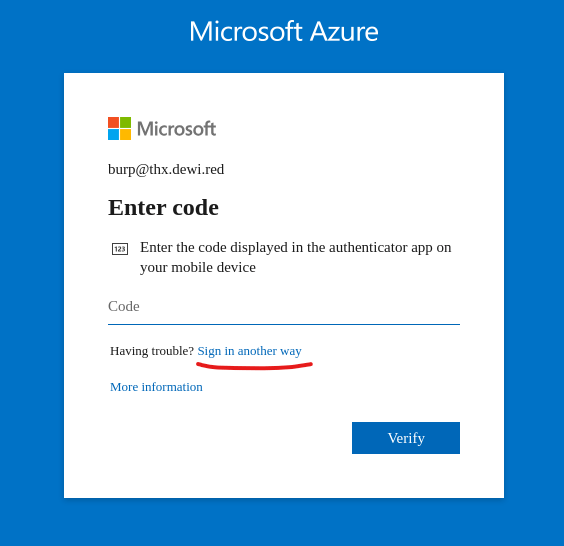
- Please note, if the Entra ID method is currently available, it will be primarily shown, and the EAM method is available via ’Sign in another way’
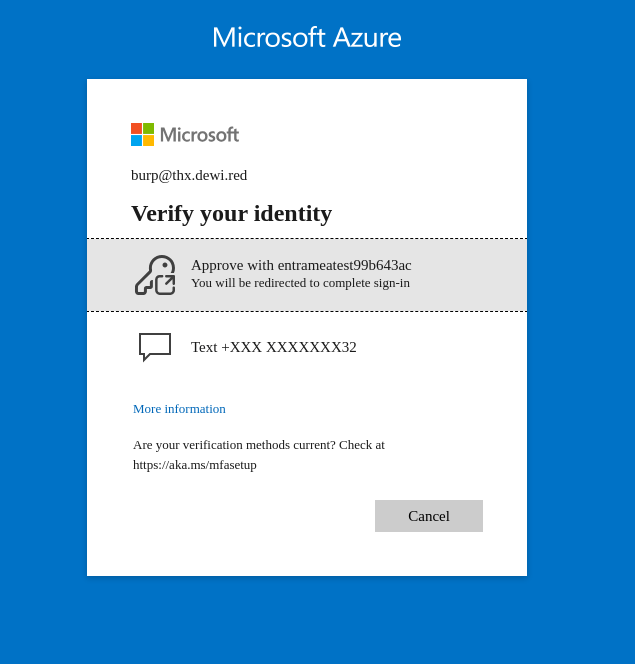
- If SMS is available, it is shown alongside
Configuration notes
- JWKS URI metadata – X5C and X5T must be present on the metadata, and the X5T value present the metadata has to be product of ’base64url’ (For non OIDC metadata using flows, I’ve have been able to use just the base64 product, and ended up spending considerable amount of time not understanding this in the first place)
  const certBase64 = certPem
    .replace('-----BEGIN CERTIFICATE-----', '')
    .replace('-----END CERTIFICATE-----', '')
    .replace(/\s+/g, '');

  const certDerBuffer = Buffer.from(certBase64, 'base64');
  const x5tBuffer = crypto.createHash('sha1').update(certDerBuffer).digest();
  const x5t = x5tBuffer.toString('base64url');
{
    "keys": [
      {
        "use": "sig",
        "kty": "RSA",
        "kid": "_ep_nvtxmNpgk4WoSZm2nQPYXaxSfRMWGKwh8-K6uZ8",
        "alg": "RS256",
        "n": "kt9kIJagpHuaKg3Y-R5888uaxzqXtTQ7KzbNwWBF7lQws3xrwbYnaqpMTMahMISjiXSZ_xgYbSqkaafrB1G6kNG3M9gc1OeExVU81mqlRMYIGrISce4tPqGSCGnE4J23Eieu4CubS8FCvWCilzIBPxzT2n0fIXJA4uexUz-zSGFld0r8jD9Vgf09eTNeTH-f-7H50ya9IHYYKFmXEBFHqR_gqdY8G_13b2n2brVLuu4hgwStHLa33s0abuMzVH9ZELEiNPdfgdvlJevJDy_0Wx_T2ghGbMyidtK56vP1g7mqlUGMlZEphL2tQQumdWzAzwcG8Xo3m8vDFF8-tEpCCQ",
        "e": "AQAB",
        "x5t": "0TOhvR3MDrqfhCPOpHKh1stDPtg",
        "x5c": [
          "MIIDCzCCAfMCFBiRPz3iR2QFknoue6oGWa7AksCpMA0GCSqGSIb3DQEBCwUAMEIxCzAJBgNVBAYTAkZJMRswGQYDVQQDDBJzcG5mb3JhYWQubG9jYWxkb20xFjAUBgNVBAsMDUlUIERlcGFydG1lbnQwHhcNMjQwODEyMDYwOTM1WhcNMjYwODAyMDYwOTM1WjBCMQswCQYDVQQGEwJGSTEbMBkGA1UEAwwSc3BuZm9yYWFkLmxvY2FsZG9tMRYwFAYDVQQLDA1JVCBEZXBhcnRtZW50MIIBIjANBgkqhkiG9w0BAQEFAAOCAQ8AMIIBCgKCAQEAkt9kIJagpHuaKg3Y+R5888uaxzqXtTQ7KzbNwWBF7lQws3xrwbYnaqpMTMahMISjiXSZ/xgYbSqkaafrB1G6kNG3M9gc1OeExVU81mqlRMYIGrISce4tPqGSCGnE4J23Eieu4CubS8FCvWCilzIBPxzT2n0fIXJA4uexUz+zSGFld0r8jD9Vgf09eTNeTH+f+7H50ya9IHYYKFmXEBFHqR/gqdY8G/13b2n2brVLuu4hgwStHLa33s0abuMzVH9ZELEiNPdfgdvlJevJDy/0Wx/T2ghGbMyidtK56vP1g7mqlUGMlZEphL2tQQumdWzAzwcG8Xo3m8vDFF8+tEpCCQIDAQABMA0GCSqGSIb3DQEBCwUAA4IBAQAITXUUDcjD2agLIXrZA1O/mt+i5P7ewU8AU/ejnojjsbmNG6KxyH+xN4F+EWORuIp9MDL1ld0B8N04fz5XYbwzzYVwTAUe74SZ8RC81Uuwxkt5fb0rsMyC+mbJN9DNlS6jjLrqPH2tMGfpXjsN9ruWOUHt7WtE51K5ebGVXb79rt0ZTp4Pkn/s2/YbD+5vMhqDcxiw1ih63F9hoNxUizz0J2r0v1xiMw1F9LgY6tmcyszijJfT4+W8sWSAlbvfPU9HTlhIzaGcB1WUsuv/TBgh9PT7SdMdZuZerw5G8BJi3Z0AZrZ2hak+7I2j1fbYqn6N07KQhsVPDB5yKdLXg9Gz"
        ]
      }
    ]
  }
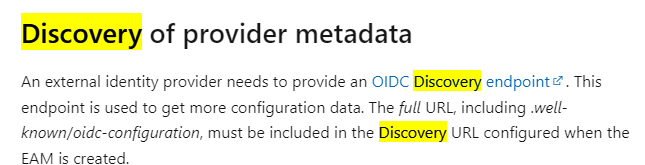
- Issuer Address – Needs to be the full URL for the issuer field (I have had some previous experiences where for OIDC, I just provided the root of the OIDC URL, omitting the
/.well-known/...part)
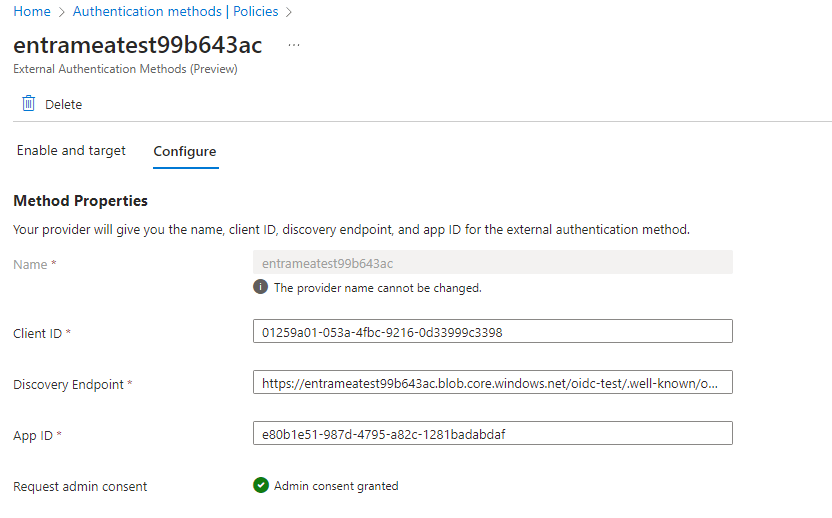
- including .well-known/oidc-configuration, must be included in the Discovery URL configured when the EAM is created.
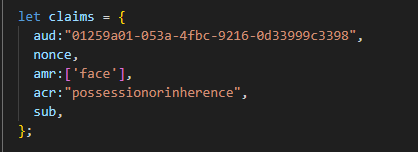
- Provider response – acr claim should be single value, not an array containing single value
Example configs
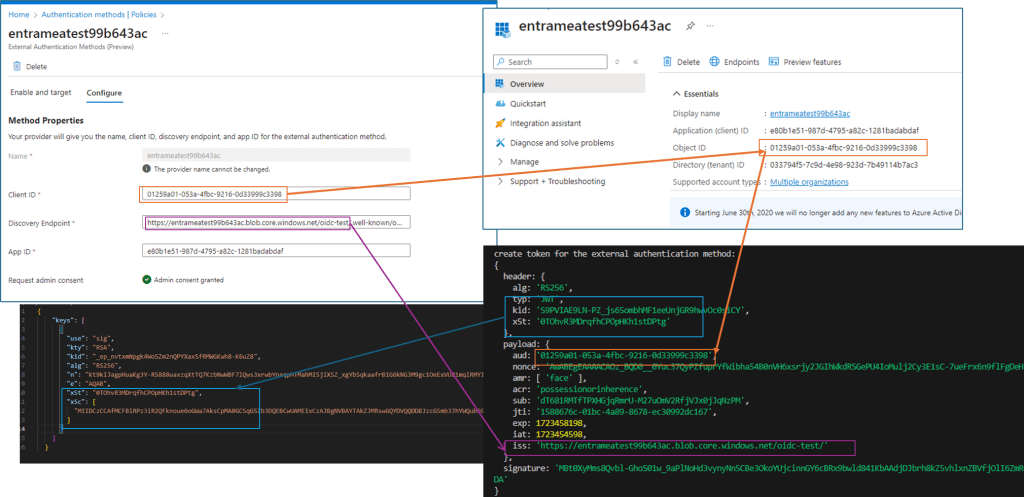
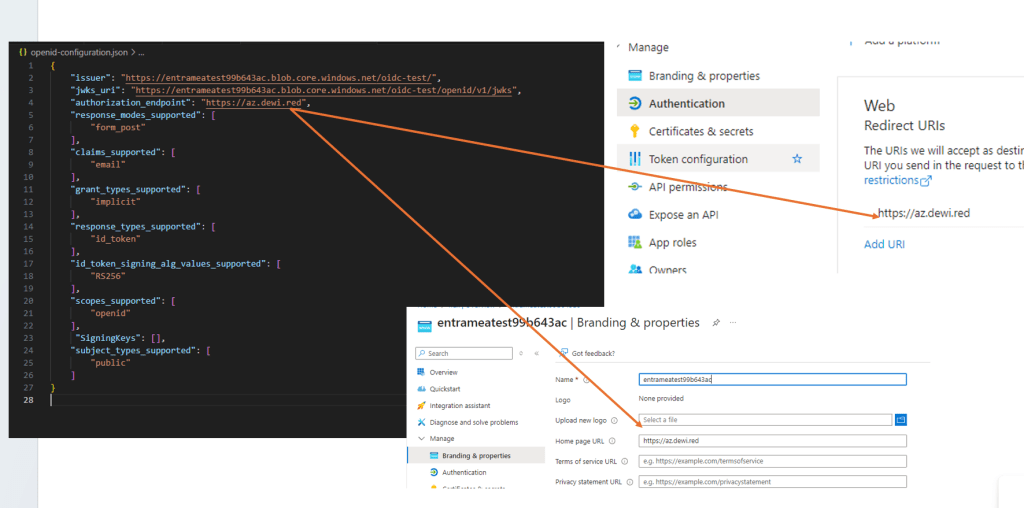
- External authentication method and the relation to app
#JWKS.JSON
{
    "keys": [
      {
        "use": "sig",
        "kty": "RSA",
        "kid": "_ep_nvtxmNpgk4WoSZm2nQPYXaxSfRMWGKwh8-K6uZ8",
        "alg": "RS256",
        "n": "kt9kIJagpHuaKg3Y-R5888uaxzqXtTQ7KzbNwWBF7lQws3xrwbYnaqpMTMahMISjiXSZ_xgYbSqkaafrB1G6kNG3M9gc1OeExVU81mqlRMYIGrISce4tPqGSCGnE4J23Eieu4CubS8FCvWCilzIBPxzT2n0fIXJA4uexUz-zSGFld0r8jD9Vgf09eTNeTH-f-7H50ya9IHYYKFmXEBFHqR_gqdY8G_13b2n2brVLuu4hgwStHLa33s0abuMzVH9ZELEiNPdfgdvlJevJDy_0Wx_T2ghGbMyidtK56vP1g7mqlUGMlZEphL2tQQumdWzAzwcG8Xo3m8vDFF8-tEpCCQ",
        "e": "AQAB",
        "x5t": "0TOhvR3MDrqfhCPOpHKh1stDPtg",
        "x5c": [
          "MIIDCzCCAfMCFBiRPz3iR2QFknoue6oGWa7AksCpMA0GCSqGSIb3DQEBCwUAMEIxCzAJBgNVBAYTAkZJMRswGQYDVQQDDBJzcG5mb3JhYWQubG9jYWxkb20xFjAUBgNVBAsMDUlUIERlcGFydG1lbnQwHhcNMjQwODEyMDYwOTM1WhcNMjYwODAyMDYwOTM1WjBCMQswCQYDVQQGEwJGSTEbMBkGA1UEAwwSc3BuZm9yYWFkLmxvY2FsZG9tMRYwFAYDVQQLDA1JVCBEZXBhcnRtZW50MIIBIjANBgkqhkiG9w0BAQEFAAOCAQ8AMIIBCgKCAQEAkt9kIJagpHuaKg3Y+R5888uaxzqXtTQ7KzbNwWBF7lQws3xrwbYnaqpMTMahMISjiXSZ/xgYbSqkaafrB1G6kNG3M9gc1OeExVU81mqlRMYIGrISce4tPqGSCGnE4J23Eieu4CubS8FCvWCilzIBPxzT2n0fIXJA4uexUz+zSGFld0r8jD9Vgf09eTNeTH+f+7H50ya9IHYYKFmXEBFHqR/gqdY8G/13b2n2brVLuu4hgwStHLa33s0abuMzVH9ZELEiNPdfgdvlJevJDy/0Wx/T2ghGbMyidtK56vP1g7mqlUGMlZEphL2tQQumdWzAzwcG8Xo3m8vDFF8+tEpCCQIDAQABMA0GCSqGSIb3DQEBCwUAA4IBAQAITXUUDcjD2agLIXrZA1O/mt+i5P7ewU8AU/ejnojjsbmNG6KxyH+xN4F+EWORuIp9MDL1ld0B8N04fz5XYbwzzYVwTAUe74SZ8RC81Uuwxkt5fb0rsMyC+mbJN9DNlS6jjLrqPH2tMGfpXjsN9ruWOUHt7WtE51K5ebGVXb79rt0ZTp4Pkn/s2/YbD+5vMhqDcxiw1ih63F9hoNxUizz0J2r0v1xiMw1F9LgY6tmcyszijJfT4+W8sWSAlbvfPU9HTlhIzaGcB1WUsuv/TBgh9PT7SdMdZuZerw5G8BJi3Z0AZrZ2hak+7I2j1fbYqn6N07KQhsVPDB5yKdLXg9Gz"
        ]
      }
    ]
  }

#OIDC METADATA

{
    "issuer": "https://entrameatest99b643ac.blob.core.windows.net/oidc-test/",
    "jwks_uri": "https://entrameatest99b643ac.blob.core.windows.net/oidc-test/openid/v1/jwks",
    "authorization_endpoint": "https://az.dewi.red",
    "response_modes_supported": [
        "form_post"
    ],
    "claims_supported": [
        "email"
    ],
    "grant_types_supported": [
        "implicit"
    ],
    "response_types_supported": [
        "id_token"
    ],
    "id_token_signing_alg_values_supported": [
        "RS256"
    ],
    "scopes_supported": [
        "openid"
    ],
     "SigningKeys": [],
    "subject_types_supported": [
        "public"
    ]
}
Preview limitations

Other sources
If you’ve configured workload federation in Entra the setup has some areas which are very similar to this one, and can save you some time
Azure AD Workload Federation anywhere?
Azure App Service – Authorize custom JWT tokens from API clients
Resources
The code I wrote is very quick and dirty, but I can consider making some examples in github if requested
 SecureCloudBlog
lol, nice message when going to your awesome blog
https://ibb.co/9wsKKW5
TykkääTykkää
Almost the same 🤣
TykkääTykkää