
If you see the following error in App Service: You can try the following two options if it mitigates your issue.
{
  "code": 401,
  "message": "IDX10205: Issuer validation failed. Issuer: '[PII is hidden. For more details, see https://aka.ms/IdentityModel/PII.]'. Did not match: validationParameters.ValidIssuer: '[PII is hidden. For more details, see https://aka.ms/IdentityModel/PII.]' or validationParameters.ValidIssuers: '[PII is hidden. For more details, see https://aka.ms/IdentityModel/PII.]'."
}
Options
- Allow tokens issued without V2 suffix
- Force the app to use V2 suffix: Change the following value in function App Registration manifest ”accessTokenAcceptedVersion”
Option 1:
Remove the v2 suffix
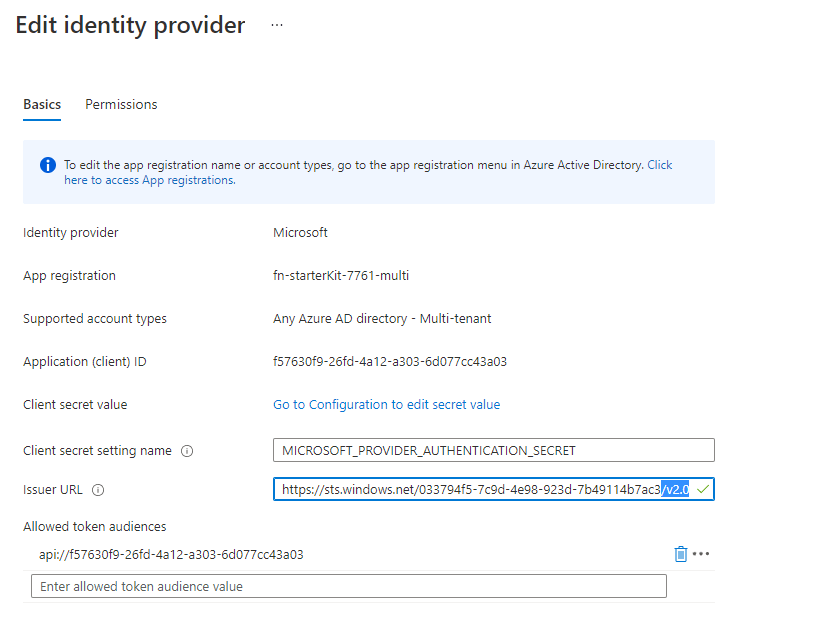
Option 2:
Go to the app manifest for the function via the ’Authentication’ menu, and change ’accessTokenAcceptedVersion’ to 2

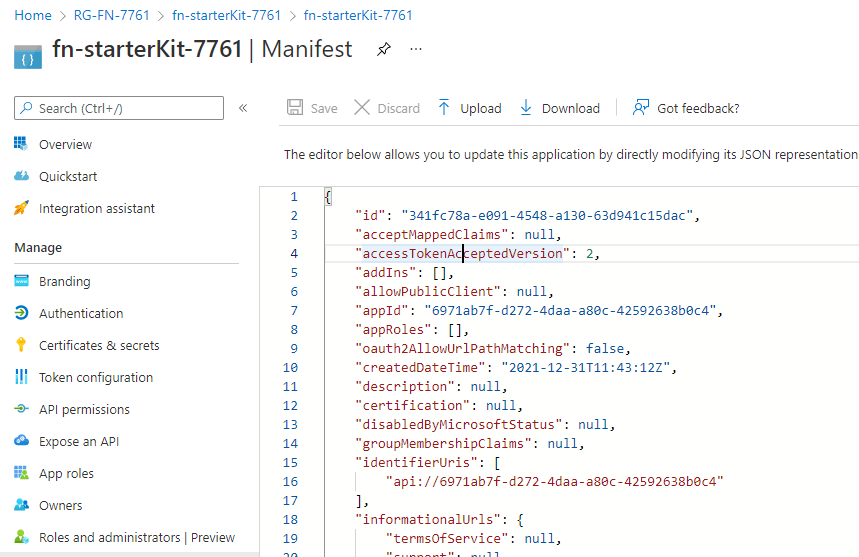
- Now try to request token (example for client credentials)
{
    method:"POST",
    url: `https://login.microsoftonline.com/033794f5-7c9d-4e98-923d-7b49114b7ac3/oauth2/v2.0/token`,
    data:{
        grant_type:"client_credentials",
        client_id:"e857464f-d14c-4b6c-a2df-558f1685d7d4",
        client_secret:require('./s.json').s,
        scope:"6971ab7f-d272-4daa-a80c-42592638b0c4/.default"
    }
}
 SecureCloudBlog
0 comments on “App Service – ’Issuer validation failed’ – Troubleshooting”